Boost Your NGO Website Speed by Optimizing Image Caching TTLs
5 min read · Written on December 31, 2025

For non-profit organizations, maintaining a professional presence online is critical for engaging users and building credibility. A fast, responsive website ensures visitors stay engaged, explore your programs, and connect with your mission.
One of the easiest ways to drastically improve your website’s performance and speed - especially on mobile devices is by optimizing how your website handles images through efficient caching policies.
Understanding Caching TTL
When a visitor loads your website for the first time, their web browser (Chrome, Firefox, etc.) downloads all the content, including your photos and logos.
Caching is the process where the browser saves a copy of those files locally. This is like storing a snack in your backpack instead of walking back to the grocery store every time you get hungry.
TTL (Time to Live) is the instruction that tells the browser how long it should keep that saved image before deleting it and asking your server for a new copy.
If your cache TTL is short - for instance, 4 hours (14,400 seconds) - the browser is instructed to fetch the image from your server again every four hours, even if the image hasn't changed. This constant fetching slows down the user experience and gives your website a low performance score on tools like PageSpeed Insights.
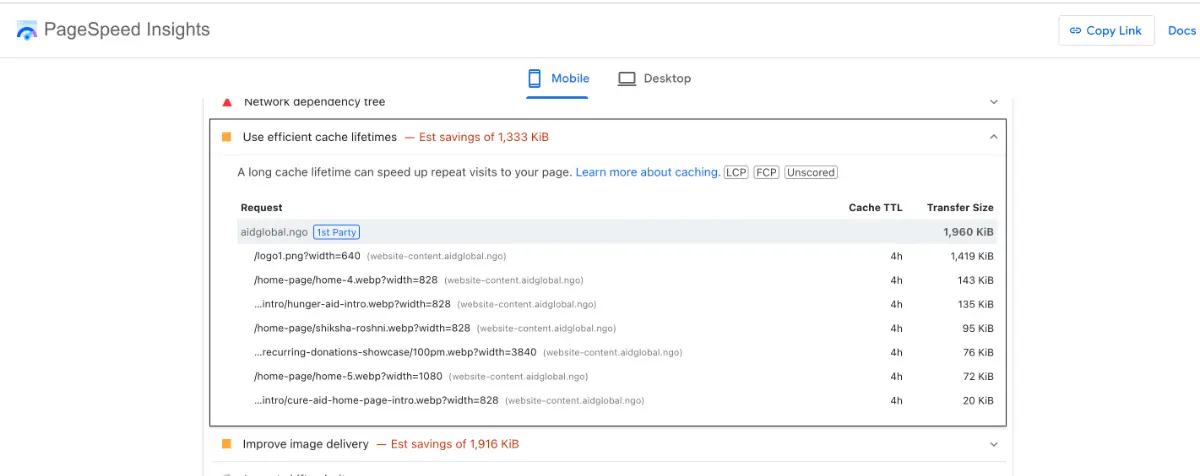
The Goal: We want to increase the TTL for static files (like images and videos) to a much longer period, such as 1 month. This tells the browser to use the saved, local copy for 30 days, reducing server load and making your site feel significantly faster.
Implementing Efficient Cache Lifetimes
To fix the common optimization issue Serve Images with Efficient Cache Policy you need to modify the response headers sent by your image server or Content Delivery Network (CDN).
Method 1: Adjust Server Headers (If Self-Hosting)
If you are serving images directly from your own server, you simply need to set the image response headers to a longer duration, ideally at least 1 month. Here are some examples in popular frameworks.
// Express.js
app.use('/images', express.static('images', {
  setHeaders: (res) => {
    res.setHeader('Cache-Control', 'public, max-age=2592000, immutable');
  }
}));
// Flask
resp.headers['Cache-Control'] = 'public, max-age=2592000, immutable'// FastAPI
return FileResponse(
filename,
headers={"Cache-Control": "public, max-age=2592000, immutable"}
)Now this will inform the browser to keep the static files in the browser cache for at least a month before requesting again from the server.
Method 2: Customizing CDN Rules (If Using a CDN like Cloudflare)
Many modern websites, especially those using platforms like NEST, utilize a Content Delivery Network (CDN) layer on top of their image storage (often an object storage bucket like S3 or R2). A CDN improves speed because it uses geographically distributed caching servers, delivering the image from a location closer to the user.
If you use a CDN, you need to create a caching rule to override the default TTL settings. You must customize two essential components:
CDN TTL: This controls how long the CDN itself stores the image before requesting it again from your storage bucket. You should customize this to a hard-coded long value, such as 1 month.
Browser TTL: This tells the user’s browser how long to store the images before requesting them from the CDN again. You should override this to 1 month as well.
By setting the cache to stay for a month in both the browser and the CDN, you greatly reduce the requests hitting your server and boost performance significantly.
Once this rule is deployed, you should see your overall website performance increase, often substantially for both mobile and desktop users.
Watch the Full Implementation Guide
To see a step-by-step technical demonstration of how these caching rules are configured in a real-world scenario to achieve higher PageSpeed scores, watch the video below:
Empowering Your Mission with NEST
This approach to optimizing website performance is part of a larger strategy to professionalize your online presence and automate administrative burdens. That’s why we built NEST (NGO Enablement & Support Toolkit) - The All-in-One Admin Panel built exclusively for NGOs.
NEST helps forward-thinking NGOs build trust, save time, and increase impact:
Automation and Efficiency: NEST automates boring administrative tasks. AI-Powered Automations can draft articles, analyze data, and generate emails automatically, meaning your team saves 60–80% of admin time to focus on programs instead of paperwork. For example, complex tasks like creating verifiable certificates for volunteers can be done with one-click.
Security and Privacy: Unlike general tools, NEST is 100% privacy-focused. It follows a zero third-party data leakage approach. All sensitive beneficiary and donor data is stored securely in your own database, complying with GDPR and local laws, increasing credibility because you keep everything under your own domain.
NGO-Specific Tools: NEST removes bloated features found in general site builders and adds purpose-built tools, including a secure Custom Form Builder, comprehensive Volunteer Management, a Content Management System (CMS) with AI-assisted SEO, Role-Based Access, and integrated Fundraising Campaigns that accept UPI and card payments.
Unmatched Value: NEST is significantly more affordable than combining multiple individual tools. You pay a simple, transparent one-time setup fee followed by a low monthly subscription, giving you continuous AI improvements, dedicated support, and lifelong updates.
Support Global Change
We are proud that organizations like the Aid Global Foundation rely on NEST to manage their operations seamlessly.
The Aid Global Foundation is dedicated to bringing change to society through various programs, including efforts in education, hunger, health care, rehabilitation, and women empowerment. They actively work on life-changing initiatives, such as running programs to treat Clubfoot issues and distributing essential items like food and wheelchairs.
If you are someone who likes supporting good causes, please consider learning more about the invaluable work the Aid Global Foundation is doing and donating to help them continue their impact.