Securing Your Services from Threat Actors
11 min read · Written on February 27, 2026 · Updated on February 28, 2026
Keeping your web apps, APIs, mobile apps, and internal automations safe requires a multi-layered approach. At K34a we’ve built many systems for startups and learned that careful design from the start makes all the difference.
Below are some of the key practices we use to protect services from attackers and how startups can apply them.
API Gateway Security
An API gateway or reverse proxy is like a guard at the front door of your services. It centralizes security checks and traffic management for all your endpoints.
A gateway can handle TLS (HTTPS) so that all data in transit is encrypted, since without TLS a hacker could steal sensitive tokens or passwords.
The gateway also checks authentication, applies access rules, and routes each request to the right backend. For example, AWS describes API Gateway as “the ‘front door’ for applications” that manages traffic, authentication, and monitoring for all API calls. In practice, we often put all requests through a gateway and attach a Web Application Firewall (WAF). The WAF blocks common attacks (like SQL injection or XSS) before they even hit our code. Using a gateway means you don’t have to individually protect every endpoint - controls like IP filtering, SSL enforcement, and rule sets are applied in one place. This simplifies management and stops many attacks early.
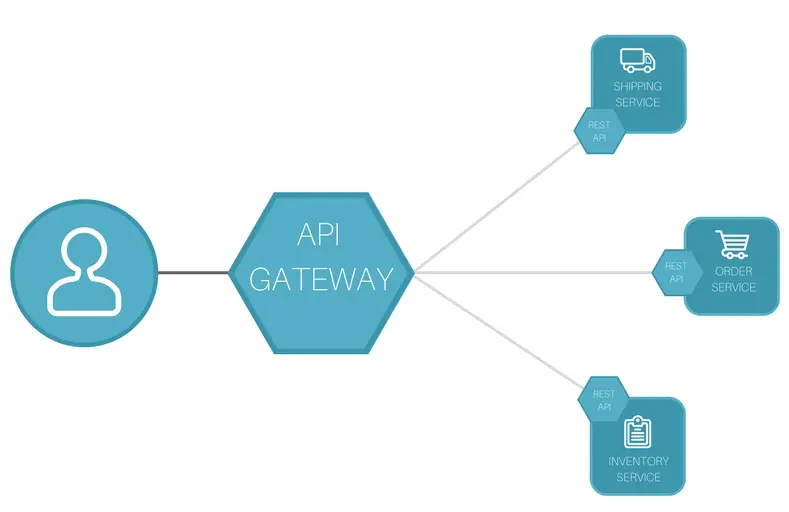
[Figure: Typical API gateway architecture. All external requests pass through the gateway, which enforces security policies and then forwards valid traffic to backend services.]
An API gateway sits between clients and your services, handling TLS, auth, rate limits, logging, and more.
In our 10+ years of experience developing projects for different organizations and startups, adding a gateway dramatically improves the security posture of the organization. The microservices are placed behind a managed gateway. For a few of our clients, we have discovered hidden unsecured admin endpoints from the logs, something which could not have been done without gateway or mindful logging. By blocking those endpoints at the gateway itself, we prevent multiple serious exploits.
In short, always design with a gateway: it enforces HTTPS/TLS and central access rules so each request is checked before it reaches your code.
Authentication and Authorization
Once traffic reaches your gateway, you still must verify who is talking and what they can do. Use proven authentication (authN) methods and strict authorization (authZ) checks. Wherever possible, integrate with standards like OAuth 2.0 or OpenID Connect. Don’t invent your own login system. For example, one simple best practice is to use OAuth2: an external identity provider (like Google, Auth0, or Azure AD) handles user logins, and your services trust its tokens. This way you avoid storing raw passwords and benefit from built-in security and MFA options. As a rule, enforce multi-factor authentication (MFA) for admin or sensitive accounts - it’s a minor step for users but prevents most credential theft.
Always enforce HTTPS/TLS for all endpoints (the gateway should do this).
"Without TLS, a third party could intercept and read sensitive information in transit, like API credentials and private data"
We remind clients that encrypting traffic is a non-negotiable: all API calls should use https:// so data (and login tokens) stay safe. Users want to see the lock icon on the browser when they visit your application, so it builds trust.
For authorizations, implement fine-grained controls. If your service uses JWT tokens, ensure they are signed, have short expiration, and contain no secret info. Do not embed sensitive user data in tokens where attackers could decode it (anyone can decode JWTs now). Instead, validate each token’s signature and expiry in the gateway or service code, and check the user’s roles or scopes from your database on every request. The gateway can reject invalid, malformed or expired tokens upfront.
In a recent project, we had a client whose app stored API keys insecurely. After a breach scare, we switched them to OAuth tokens with automatic rotation. Now any leaked token quickly expires or is auto-revoked, greatly reducing risk exposure. This kind of policy (short-lived tokens, automatic key rotation) follows industry advice for token lifecycle management.
Role-Based Access Control (RBAC) and Just-In-Time Access
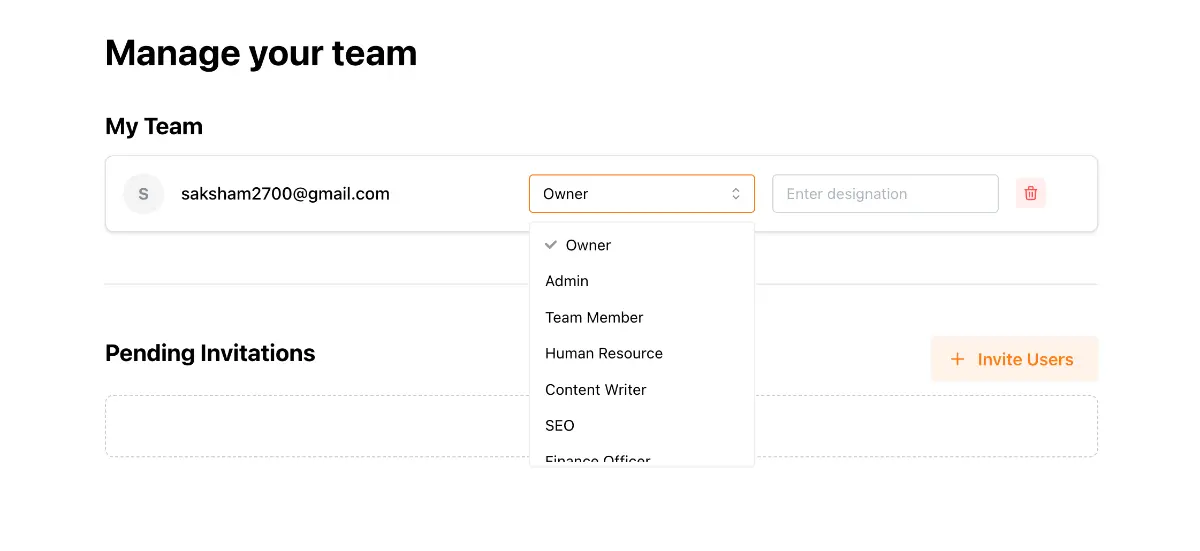
Even with login and tokens, you need to ensure each user or system can only do what they’re supposed to.
Role-Based Access Control (RBAC) is a proven way to manage this. With RBAC, you define roles (like 'user', 'manager', 'admin') and assign permissions to roles rather than individuals. For example, a 'viewer' role might only read data, while an 'editor' can also create or change records. Users are then added to roles as needed. Users get privileges tied to their role, and if they no longer have that role their access is removed.
This makes it easy to revoke permissions by simply taking someone out of a role.
RBAC supports the principle of least privilege: people have only the minimal access they need. In practice we often combine RBAC with “just-in-time” (JIT) access. This means adding a user to a privileged role only while working on a task, then removing them right after. In other words, grant admin or sensitive access only on demand and for a limited time.
For example, if a developer needs temporary database admin rights to fix an issue, our system can automatically grant that role for a day and then revoke it.
CrowdStrike notes that JIT access “significantly reduces the exposure of critical assets” by minimizing how long extra privileges exist. We once enabled JIT in a CI/CD pipeline: build accounts were given elevated permissions only while deployments ran, shutting off access immediately after. This practice shrinks the attack window and prevents old credentials from lingering.
In summary, use RBAC so that permissions are attached to roles and not to user accounts directly. Then apply JIT provisioning or automated workflows (with approvals if needed) to issue roles only when needed and for the shortest time necessary. These measures ensure your team can work efficiently without leaving permanent high privileges that attackers could exploit.
Rate Limiting and Throttling
To defend against abuse, always enforce rate limits on your APIs and services. In other words, restrict how many requests a client or user can make in a given time. This stops attackers from hammering your system with brute force or denial-of-service attacks.
As a best security practice, implement a limit on how often a client can call the API within a defined timeframe. We can configure gateways or proxies to apply such limits automatically (e.g., 100 requests/minute per IP). If a client exceeds the limit, the gateway can return an HTTP 429 error or temporarily block that client.

OWASP even lists lack of rate limiting as a top API flaw: many APIs without limits can be made unresponsive by a flood of calls. We’ve seen automated scripts probe login APIs aggressively; once we set a limit of e.g. 5 attempts per minute per IP, the brute force slowed to a crawl and the customer’s logs immediately showed many 429 responses rejecting excess requests. Modern API gateways also support “burst” controls so normal traffic spikes are allowed up to a point, then throttled beyond the limit.
Some additional tips: use exponential backoff on the client side when you return retry codes, and consider implementing a circuit-breaker pattern if a backend service starts failing under load. Together, these measures ensure that even if an attacker finds your endpoints, they can’t overload them easily.
Logging and Monitoring
No security plan is complete without good logging. As soon as something happens, you need records to spot it. Always log security-relevant events (such as logins, permission changes, or failed requests) so that you can detect incidents and investigate attacks later. For example, log every user login attempt, every API authorization check, and every unexpected error.
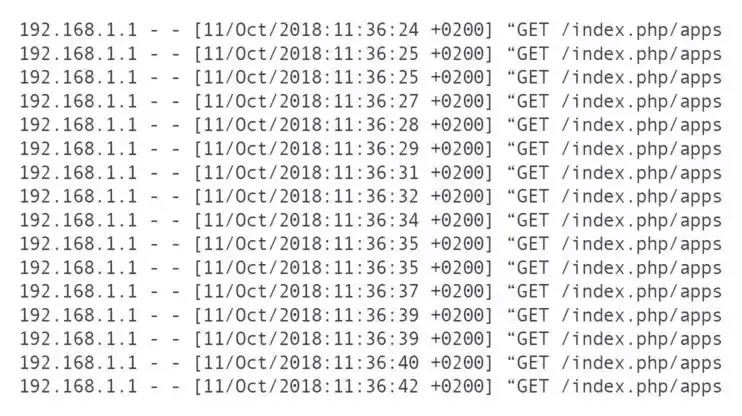
Be mindful what you log. Never record sensitive secrets (like passwords, full credit card data, or raw tokens) in logs. OWASP explicitly warns against logging auth passwords, session tokens, or personal identifiers in plain text. Instead, log events with safe context (e.g. user ID and action, not their password). Also use consistent formats (timestamps, JSON fields, etc.) so logs from different services can be correlated in one system. We often set up a centralized log system (such as ELK, Splunk, or a cloud service) that gathers all app and gateway logs in one place. OWASP recommends a centralized logging system so you don’t miss cross-service events.
We always turn on logging from the start of a project. In fact, OWASP advises integrating automated log analysis from day one, because adding it late becomes very hard. In one project our logs alerted us immediately to a misconfigured endpoint: an internal API was receiving valid requests from an unknown IP. Without those logs, we’d have had no clue. Logging also feeds alerting: high error rates or unusual patterns (like a spike in 403 errors) can trigger notifications to your team for quick action.
Finally, protect your logs from tampering. Secure the log storage, use encryption or write-once media if needed, and monitor for deletions. After all, attackers sometimes try to cover their tracks by destroying logs. By treating your logs as valuable, you ensure you can learn from any incident and improve your defenses.
Keeping Packages Up to Date
A strong app defense needs up-to-date foundations. Most modern applications rely on open-source libraries and packages (for example, Java [Maven] packages, Node [npm] packages, Python [PyPI] libraries). Any old or vulnerable package can become an entry point for attackers. OWASP guidance makes this clear:
"Ensure all third-party dependencies are free of known security issues, and if issues arise, fix them quickly."
To achieve this, we automate dependency management. Use tools like Dependabot, Snyk, or npm audit to regularly scan for vulnerabilities and notify you of fixes. The OWASP guide on dependencies says: run automated checks from the start of the project, because adding them later means a mountain of work.
One company that I worked with had a 15 year old software with 10 microservices. They hadn't upgraded packages since the start and were operating on Java 1.8 and Spring Boot 2.1.0. When traffic increased and security team wanted vulnerabilities to be fixed, it took us 2 member team about 6 months (even after taking help from AI) to upgrade the project to the latest versions, and another 3 months to stabilize it.
In practice, we configure CI pipelines to check for new versions: when a library releases a security patch, the CI opens a pull request to update it. Then our tests ensure nothing broke and we merge the fix. This keeps your stack on the “latest secure versions” with minimal manual effort.
Also follow best practices like pinning versions (so builds are reproducible) and verifying package signatures or hashes to avoid supply-chain attacks. Remove unused dependencies, too - each extra library is another potential vulnerability. We often see teams accumulate packages they no longer need; cleaning these up cuts risk and reduces the attack surface.
In short, stay current with patches. A surprising number of breaches happen via known library vulnerabilities (think of past incidents like the Equifax breach). By continuously monitoring and updating your packages, you close that door.
Conclusion
Security is not a one-time checklist but a mindset built into every layer. By designing your services behind a secure gateway, enforcing strong authN/Z, limiting traffic, controlling roles, logging everything, and keeping software updated, you create a robust defense against threat actors. At K34a we’ve helped many startups implement these measures – for example, adding gateway logging once saved a client from a hidden data leak, and enabling just-in-time roles meant a team could collaborate safely without exposing a permanent admin account.
For founders and business owners, the technical terms can be daunting. But these principles can be implemented using modern platforms and tools with our guidance at K34a. We partner with startups to make security simple and practical – because protecting user data and your business is fundamental. By following the advice above, you give your applications a strong security posture and peace of mind as you grow.